Posts

Showing posts with the label SHIFT

Move Columns & Rows Quickly
Image
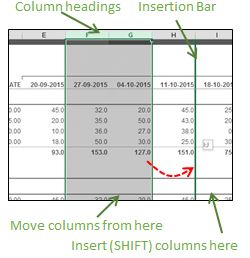
Excel Tip #026 Move Columns & Rows Quickly I often see Excel users 'moving' a column by inserting a blank column where they want to move the column, drag the original column and drop it in the empty column, the go back and delete the empty original column. Same thing for rows. There is a much, much easier and faster way! Move Columns To move a column (or multiple columns) and insert it (them) between two other columns,       1) Select the column(s) you want to move      2)   Hold down the SHIFT key. Holding down SHIFT tells Excel to 'insert' the columns      3)   Point to the edge of the selected column(s)      4)   Press and hold your left mouse button to drag and position the 'insertion bar' where you want to move the column(s)      5)   Release the mouse button, then release the SHIFT key Move Columns Alternatively,  Right-click column heading you w...

Search Backwards in Excel

Excel Tip #022 Search Backwards in Excel Sometimes we take some things for granted in Excel and assume that everyone else knows too. Here's a tip which lot of Excel users don't know about it. Many Excel users know that the quickest way to find something in a large worksheet is to use Excel's Find command. On the Home tab, in the Editing group, click Find & Select , then Find or, preferrably, use the keyboard shortcut CTRL+F instead. Each time you click Find Next you will be taken to the next matching cell, starting from the active cell and going down the sheet until you finally come to the last one. But what if you want to find the 'last' matching value in a sheet and there are dozens or even hundreds of matching values? You don't want to click through each one until you finally reach the end. Here's a simple trick that will save you some time. Select a cell below the range you want to search ( CTRL+END is a shortcut you can use to quick...