Move Columns & Rows Quickly
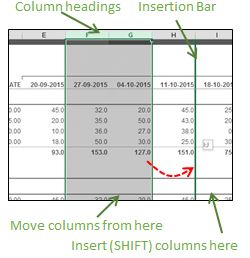
Excel Tip #026 Move Columns & Rows Quickly I often see Excel users 'moving' a column by inserting a blank column where they want to move the column, drag the original column and drop it in the empty column, the go back and delete the empty original column. Same thing for rows. There is a much, much easier and faster way! Move Columns To move a column (or multiple columns) and insert it (them) between two other columns, 1) Select the column(s) you want to move 2) Hold down the SHIFT key. Holding down SHIFT tells Excel to 'insert' the columns 3) Point to the edge of the selected column(s) 4) Press and hold your left mouse button to drag and position the 'insertion bar' where you want to move the column(s) 5) Release the mouse button, then release the SHIFT key Move Columns Alternatively, Right-click column heading you w...