Posts

Showing posts with the label Month

Subtotal Dates By Month (or) Year
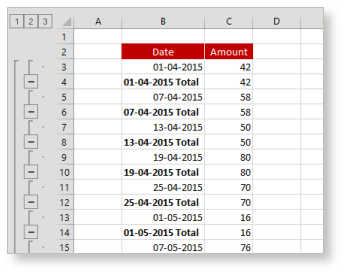
Image
Excel Tip #029 Subtotal Dates By Month (or) Year There may be times when you want to subtotal your data by month and year, however simply Subtotaling a column of dates won't work because that will create a subtotal for each day. Subtotal Dates - Example Here's a trick you can use to create subtotals for each month while ignoring the day... 1) Sorted your dates by selecting a single date within the table and from the Data tab click the sort A>Z button; 2) Next you need to apply a date/number format that displays the month but not the day (e.g. mmm yyyy). To do this, from the Number group on the Home tab, click the Number Format dropdown (or press CTRL+1) and choose More Number Formats ..., then click Custom and enter mmm yyyy in the Type box. All of the dates now display the month and year (e.g. Apr 2015) Formatting Dates 3) To subtotal your data based on the month and year in the Date column, from the Data tab, click Subtotal,. in the Subtotal dial...

The use of Text function in getting the day and month from the given date

Image
Excel Tip #001 The use of Text function in getting the day and month from the given date Sometimes we may want to know the day and month of the given date. In such cases, we can make use of the TEXT function to retrieve the information. The formula to show current date is using TODAY() function. =TODAY() The functionality of TEXT function is to convert a value to text in a specific number format. Here we are going to use the same function to convert date into days & months. =TEXT(value,format_text) In the value field, we are going to assign a date and in format_text  field we can define d, m (or) y (date, month & year respectively) based on the output that we are expecting. Let us now consider the date 6/15/2014 (June 15, 2014) which is the value field. This date is defined in the cell B2 in my excel. Assigning format_text "dddd" will return the day of the date.           Formula: =TEXT(B2,"dddd") Assigning form...